 LikeThis
How to recreate an old photo
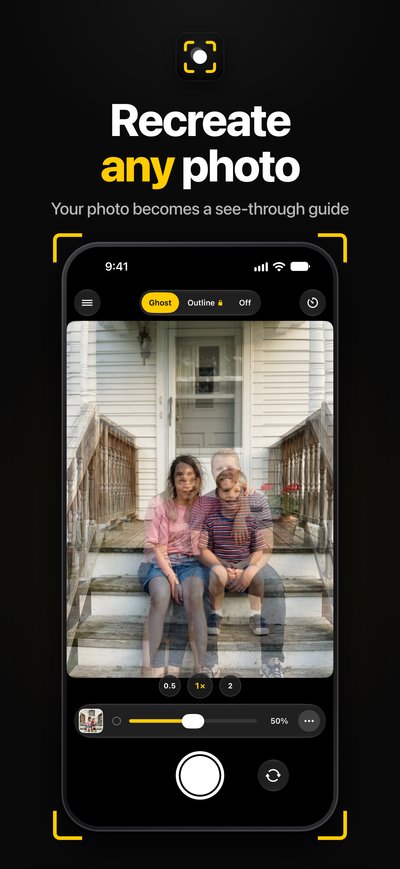
Scan the old photo, go back to the same spot, and open it in LikeThis. The photo shows as a see-through ghost on the camera. Move until the background sits on the ghost, put everyone in their old places, and take the shot. You get the old and the new photo side by side.
Last updated: 2026-10-19
What makes a recreation look right
People notice the background first. If the door, the steps or the horizon sit in the same place, the photo reads as the same photo, even if everyone is 20 years older. So the camera position matters more than the poses.
- Height: old family photos were often taken by an adult standing up. Hold the phone at the same height, not lower because the kids are now adults.
- Distance: step back until the edges of the scene match. Then use zoom only to fine-tune.
- Order: everyone sits or stands in the same order, with the same hand on the same shoulder.
Step by step
- Get the photo on your phone. Scan the print in good light, flat, without glare. A photo of the print works too.
- Go to the spot. The real place is best. If the house is gone, pick a place with the same layout.
- Open it in LikeThis. The photo is a see-through ghost on the camera. Make it strong to place things, then faint to see the real scene.
- Line up the background. Move the phone until the fixed things (walls, steps, trees) sit on the ghost.
- Place the people. Copy the poses. Use the self-timer if the photographer is in the old photo too.
- Compare and share. Slide between then and now, then share the before-and-after card.
Ideas for old photos to recreate
- Siblings on the same porch steps, in the same order.
- The first-day-of-school photo, on graduation day.
- Your parents' wedding photo, on their anniversary.
- A holiday photo at the same beach, years later.
Related
Questions people ask
How do you recreate a childhood photo exactly?
Use the same spot, the same order of people, and the same camera position. The camera position is the hard part: height and distance change everything. With the old photo as a ghost on the camera, you can see when the background lines up.
Can I recreate an old photo without AI?
Yes. LikeThis does not use AI. You take a new, real photo in the same place and pose. If you want to repair or colorize an old print, that is a different kind of app.
What if the people are much taller now?
Line up the background first, not the people. Then everyone takes their old place. The difference in size is the fun part of the before-and-after.
Is LikeThis free?
LikeThis is free to download, and your first shot is free. To keep shooting, you need LikeThis Pro: $4.99 a week or $29.99 a year, both with a 3-day free trial, or a one-time lifetime purchase. These are US prices on 2026-10-19; the App Store shows the price in your currency.
Next time, ask with the photo.
For iPhone and iPad with iOS 16 or later. Your first shot is free.